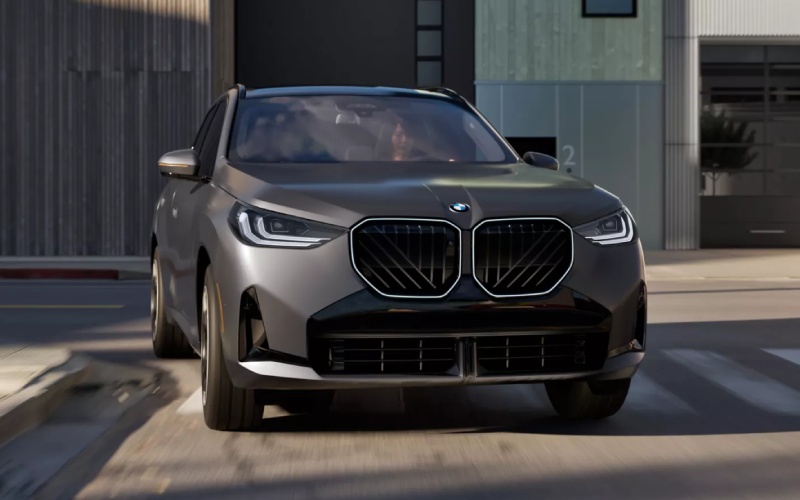
BMW of San Luis Obispo - Does the 2026 BMW X3 Support Wireless CarPlay and Android Auto in San Luis Obispo, CA?
The 2026 BMW X3 30 xDrive integrates seamlessly with everyday life around San Luis Obispo, and one of the most practical questions shoppers ask us is whether it supports wireless smartphone mirroring for navigation, calls, and music. The answer is built into the X3’s tech-first cabin: wireless Apple CarPlay and Android Auto are supported, so your iPhone or Android device can connect without a cable and display familiar apps on the expansive 14.9-inch BMW Curved Display.
Below, we explain how wireless integration works in the 2026 BMW X3, why it matters for driving across the Central Coast, and how our team at BMW of San Luis Obispo helps you get the most from features like BMW Intelligent Personal Assistant, BMW Digital Premium, and the My BMW App. We will also share pairing steps, pro tips for reliable connections on Highway 1 and U.S. 101, and how BMW’s native systems complement CarPlay and Android Auto rather than compete with them.
Wireless Apple CarPlay and Android Auto in the 2026 BMW X3
The 2026 BMW X3 pairs premium hardware with an intuitive software experience. Once paired, Apple CarPlay and Android Auto launch wirelessly at startup and place your favorite apps - Maps, Waze, Spotify, Podcasts, Messages, and more - within easy reach on the BMW Curved Display. You interact through touch, the iDrive controller, or voice via Siri or Google Assistant.
Because the connection is wireless, there is no fumbling for cables when you hop in for a quick drive from downtown SLO to Cal Poly or out to Edna Valley. The X3’s integrated Bluetooth and Wi-Fi handle the data handshake automatically, and you can still charge with a USB-C cable or a compatible wireless charger if desired. If you prefer native BMW navigation, BMW Maps remains just a tap away and benefits from smooth data streaming when equipped with BMW Digital Premium.
Why Wireless Integration Matters for San Luis Obispo Drivers
Local routes reward great tech. Coastal fog can roll across Los Osos Valley Road, winds can pick up on the Cuesta Grade, and service may dip as you curve along Highway 1 toward Morro Bay or Cambria. Wireless CarPlay and Android Auto help by keeping your go-to navigation apps front and center with current traffic, speed-limit info (when provided by the app), and dependable voice guidance.
When you are headed to a dinner downtown near the Thursday evening Farmers’ Market or meeting friends at Avila Beach, voice control through Siri or Google Assistant lets you keep your eyes on the road while placing a call, queuing a playlist, or sending a quick message. The X3 backs this up with standard safety and driver assistance features - including Active Blind Spot Detection, Lane Departure Warning, and Frontal Collision Warning with City Collision Mitigation - that support confident driving across the Central Coast.
How Pairing Works: Quick Steps
Pairing is straightforward and usually takes under two minutes. If you prefer, our delivery specialists will complete this with you at BMW of San Luis Obispo so your X3 is ready the moment you drive home.
- On the BMW Curved Display, open the phone connection menu and select Add new device.
- On your phone, turn on Bluetooth and Wi-Fi, then select your BMW from the available devices list.
- Confirm the pairing code shown on both screens and allow contacts and favorites syncing.
- When prompted, enable Apple CarPlay or Android Auto and accept all permissions on your phone.
- Set Siri or Google Assistant to respond hands-free for best voice control while driving.
Once paired, the X3 will auto-reconnect when you start the vehicle. If you switch between family phones, profiles in the BMW system make prioritizing a primary device simple.
BMW Systems That Complement CarPlay and Android Auto
The X3’s native technology is designed to work with - not against - wireless mirroring. BMW Intelligent Personal Assistant responds to natural phrases, so you can say, “Hey BMW, set the temperature to 70,” while you let Siri or Google Assistant handle messages or playlists. BMW Maps offers cloud-enhanced routing and integrates seamlessly with in-vehicle data. If you equip BMW Digital Premium, you unlock smooth data streaming for enhanced BMW Maps, entertainment, and apps on the 14.9-inch display, making downtime in a parking area by Avila Pier or between meetings in SLO more enjoyable.
And because the My BMW App stays in sync with your X3, you can check fuel status, find your parked vehicle near the Mission, or schedule service with our team - all from your phone. Remote software updates help keep systems current so your wireless connection and features remain reliable over time.
Real-World Tips for Reliable Wireless Use
San Luis Obispo drivers tell us the following best practices keep things smooth day to day. We have included a quick list you can screenshot before your test drive.
- Keep software current: Update your iPhone or Android OS and allow Remote Software Upgrade in your X3 for the latest compatibility and stability.
- Optimize voice assistants: Enable “Hey Siri” or “Hey Google,” and set Do Not Disturb While Driving to auto-reply to texts for fewer distractions.
- Plan for patchy coverage: Save offline maps for Highway 1 or remote winery roads in Edna Valley so routing continues even with spotty data.
- Prioritize profiles: If multiple drivers connect, set one phone as primary in the BMW device list to avoid connection conflicts at startup.
- Balance BMW and phone nav: For long U.S. 101 trips, try BMW Maps for integrated charging and traffic data, then switch back to CarPlay or Android Auto in town if you prefer app-based ETA sharing.
- Charge smartly: Wireless mirroring uses some battery. Use the wireless charger or a USB-C cable on longer drives to keep your phone topped up.
- Reset when needed: If audio stutters, toggle Airplane Mode on and off, or delete and re-pair the device - a quick refresh usually restores a perfect link.
If you want hands-on help, our technology specialists at BMW of San Luis Obispo will walk you through these settings and tailor them to your daily routes from SLO to Pismo Beach, Shell Beach, or Paso Robles.
What About BMW Digital Key Plus, Messaging, and Safety?
Convenience extends beyond apps. With BMW Digital Key Plus, compatible smartphones can lock, unlock, and start the X3 when in range - ideal when your hands are full after a run to the SLO Public Market. For calls and messages, the Curved Display presents alerts clearly, and voice assistants handle replies while you drive.
To minimize distraction, consider enabling message previews by voice only and letting the system auto-reply that you are on the road. The X3’s standard Active Driving Assistant features pair well with smart notification settings for a composed experience in city traffic near Madonna Road and on freeway merges by the airport.
Local Setup Support at BMW of San Luis Obispo
Our team sets up many phones every week for Central Coast drivers and knows the small toggles that make a big difference. Whether you are pairing an iPhone for Apple CarPlay before a Cal Poly campus tour or configuring Android Auto with Google Maps for wine country weekends, we will make sure your favorite apps appear exactly how you want on the 14.9-inch display. We can also demonstrate BMW Intelligent Personal Assistant and help you compare BMW Maps with your preferred phone navigation so you can choose the best tool for each trip.
Because the 2026 BMW X3 30 xDrive blends robust performance with everyday usability - from the responsive power of its 2.0-liter engine with 48V mild-hybrid technology to features like Variable Sport Steering and available Dynamic Damper Control - great technology is the finishing touch. Wireless Apple CarPlay and Android Auto turn that technology into something you use constantly, whether you are commuting up the Cuesta Grade or savoring a quiet early-morning drive to Montaña de Oro.
Have questions or want a personal tech walkthrough? Visit us at 1251 Calle Joaquin in San Luis Obispo. We will pair your device, tailor your settings, and send you on a test loop that shows how smoothly the 2026 BMW X3 fits SLO life.
Frequently Asked Questions:
Is wireless Apple CarPlay and Android Auto standard on the 2026 BMW X3?
The 2026 BMW X3 supports wireless Apple CarPlay and Android Auto integration. Setup is quick, and once paired, your phone connects automatically at startup. Availability and features can vary by software version, so our team can confirm functionality and complete pairing during your visit.
Can I use BMW Maps and Apple CarPlay or Android Auto at the same time?
Yes. You can switch between BMW Maps and your preferred phone-based navigation on the BMW Curved Display. Many SLO drivers use BMW Maps for integrated, vehicle-aware routing on longer trips, then switch to CarPlay or Android Auto for city errands and ETA sharing.
What if my connection drops on Highway 1 or in the hills above SLO?
Wireless mirroring relies on Bluetooth and Wi-Fi. If audio stutters or the screen disconnects, toggle Airplane Mode on and off, or delete and re-pair the device. Saving offline maps for areas with spotty coverage helps navigation continue uninterrupted.
Does BMW Digital Premium affect CarPlay or Android Auto?
BMW Digital Premium unlocks smooth data streaming for BMW Maps, entertainment, and apps within the BMW interface. Apple CarPlay and Android Auto remain fully compatible whether or not you choose the subscription.
Will my phone work with BMW Digital Key Plus?
Compatibility varies by device. Many recent iPhone and select Android models support BMW Digital Key Plus. We can check your exact phone in our compatibility resources and set it up during delivery.
Ready to experience the 2026 BMW X3 30 xDrive with your favorite apps on the 14.9-inch BMW Curved Display? Contact our team at BMW of San Luis Obispo to schedule a test drive, and we will handle the setup so you can hit the road from SLO with confidence.